
Snapchat Story lets users share a sequence of snaps that vanish after 24 hours, creating ephemeral visual narratives for friends or broader audiences. Key benefits include boosted audience engagement and authentic storytelling for personal updates or social media marketing. Main uses span impromptu video blogging, geo-targeted daily updates, and brand ephemeral engagement. Core components involve snaps, Geofilters, Snapchat Lenses, Augmented Reality (AR) effects, and text overlays. This guide covers Snapchat Story viewer options, download methods, anonymous viewing techniques, AI story creation, privacy controls, and private story naming ideas.
What Is a Snapchat Story?
A Snapchat Story is a collection of photos or videos compiled into a single narrative visible for 24 hours. Snapchat designed this feature to support ephemeral content that encourages spontaneous content creation. Users add snaps to their story via the camera screen, applying Snapchat filters, lenses, or Bitmoji stickers before posting. Stories appear in the Stories feed alongside Snapchat Discover content. Brands leverage Snapchat Story for Gen Z marketing, using User-Generated Content (UGC) to drive brand awareness. Snapchat Analytics tracks story views, completion rates, and audience demographics for creators and marketers using tools like Hootsuite or Snapchat Ads Manager.
Snapchat Story Viewer: Watch Without Being Seen
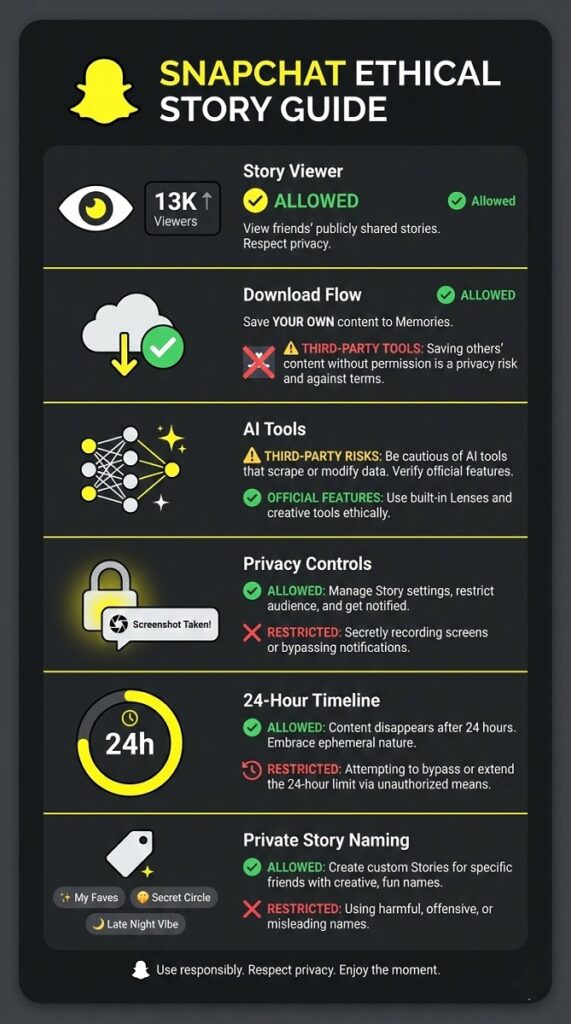
Snapchat notifies story owners each time a friend views their content. Anonymous viewing is not officially supported.
Ways to View Snapchat Stories Anonymously
There are three common methods users attempt for anonymous viewing, but all carry risks. First, enabling airplane mode after loading the story may prevent view notifications, though Snapchat updates often block this. Second, creating a secondary Snapchat account to view stories avoids linking to your main profile, but requires the story owner to accept the new friend request. Third, third-party Snapchat Story viewer websites claim anonymity but frequently violate Snapchat’s terms of service and may harvest login data. Snapchat does not endorse these methods, and account suspension can occur. For ethical viewing, respect the platform’s transparency design.
Snapchat Story Downloader – Save Stories Easily
Snapchat allows downloading your own stories but restricts access to others’ content to protect privacy.
How to Download Your Own Story
Download your Snapchat Story in two steps. First, save the story to Memories before it expires: open your story, tap the three-dot menu, and select “Save to Memories.” Second, export from Memories: go to your profile, tap the Memories icon (cloud symbol), hold your saved story, and choose “Export.” The file saves to your device gallery in standard video format. Use this method to archive content for repurposing in social media trends or cross-posting via Later.com.
Downloading Others’ Stories
Downloading friends’ Snapchat stories without explicit permission violates privacy norms and Snapchat’s community guidelines. Snapchat provides no built-in tool for this action. Third-party Snapchat Story downloader apps often contain malware or require unsafe permissions. Influencer marketing partnerships should use Snapchat Creative Studio for authorized content sharing instead. Always request consent before saving others’ ephemeral content.
Snapchat AI Story – The New Era of Creativity
Snapchat AI Story integrates artificial intelligence to generate or enhance story content, supporting contextual storytelling platforms with minimal user effort. This feature uses machine learning to suggest edits, create animations, or generate narrative text overlays. It aligns with video marketing trends by simplifying short-form video diary creation. Snapchat Spotlight creators use AI Story tools to boost content strategy efficiency while maintaining authenticity driven content standards.
How to Create an AI Story
Create a Snapchat AI Story in three steps. Open Snapchat and record or upload a snap. Tap the editing toolbar and select “AI Tools” (lightbulb icon). Choose an AI function like “Generate Caption” or “Style Transfer” to apply automated enhancements. Preview the result and post to your story. AI Story features work within Snapchat’s native editor and do not require external apps. Snapchat Analytics later shows engagement metrics for AI-assisted content.
Privacy & Security: Screenshots, Eye Icon & More
Snapchat prioritizes privacy through view tracking and screenshot alerts for story content.
What Do the Eyes Mean on Snapchat Story?
The eye icon next to a Snapchat Story displays the total number of viewers. Tap the icon to see a list of friends who watched your story. Public stories show viewer counts but hide individual names unless the viewer is your friend. Snapchat updates this list in realtime user chronicles as new views occur. Story owners cannot see how many times one person rewatched their content.
How to See Who Screenshotted Your Public Snapchat Story
Snapchat sends an immediate notification if someone screenshots your public story. Check this by opening the chat feed with the story viewer—their name appears with a screenshot icon next to their message. For non-friends viewing public stories, Snapchat only shows a generic “screenshot taken” alert without identifying the user. This system protects unfiltered user perspectives while maintaining transparency.
Snapchat Private Story Names
Private Stories let users share content with custom friend groups. Naming these stories adds personality.
Funny Private Story Names
Funny private story names include “FBI Surveillance,” “Witness Protection Program,” “My Cat’s Diary,” “Secret Agent Stuff,” and “Do Not Scroll.” These names use humor to signal exclusive content sharing among close friends.
Aesthetic Private Story Names
Aesthetic private story names feature minimalist or poetic phrasing like “golden hour,” “soft focus,” “midnight thoughts,” “cloud nine,” and “velvet sky.” These support visual micro content themes with cohesive mood-based labeling.
Cool & Trendy Names
Cool private story names reflect current slang or interests: “vibe check,” “no context,” “main character,” “offline mode,” and “chaos coordinator.” These names align with Gen Z marketing aesthetics for personalized digital postcards.
FAQs About Snapchat Stories
No, Snapchat notifies the story owner whenever you view their content. Third-party methods to bypass this violate terms of service and risk account termination.
No, Snapchat does not allow downloading others’ stories without permission. Attempting this through external apps breaches privacy policies and may expose your device to security risks.
A public Snapchat Story is visible to all your friends or a custom list you define. A private story shares content exclusively with a selected group, hiding it from your main friends list. Both types disappear after 24 hours and support Snapchat Lenses or Geofilters.
A Snapchat AI story uses artificial intelligence to generate or edit story content, such as auto-creating captions or applying style filters. This feature simplifies content creation within Snapchat’s native editor for faster storytelling.
Conclusion
Snapchat Story remains a leading platform for ephemeral visual narratives, supporting audience engagement through 24-hour content cycles. Users can view stories transparently, download their own snaps via Memories, explore AI-assisted creation tools, and manage privacy with screenshot alerts. Private story naming adds creative flair for personalized sharing. For social media marketing, Snapchat Story delivers authentic brand awareness when used ethically. Always prioritize consent and platform guidelines when sharing or interacting with Snapchat Story content.